Download and install the Touch Typing Technology course with a coupon
Step 1
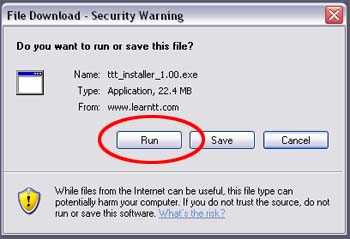
If you haven?t already downloaded the application, download this file.
At the pop up window below, select "Run".
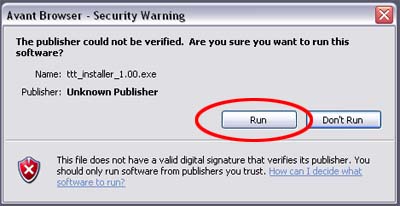
A second window may pop up - again press "Run".
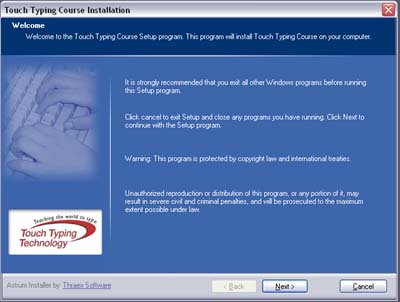
After the download is complete, another window will open with instructions
for installing the touch typing software. Follow the instructions given by this window.
Step 2
At the end of the download, the software will attempt to open. When this happens,
it will prompt you that a Security Password is required. To continue click OK.
Step 3
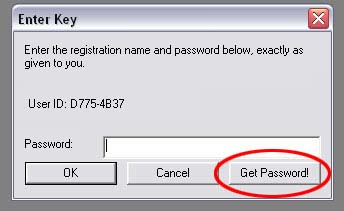
At the next prompt, do not enter anything, simply click on the "Get Password" button.
This will open up a new web browser window. Please be patient, as this process may take some time to complete.
Step 4
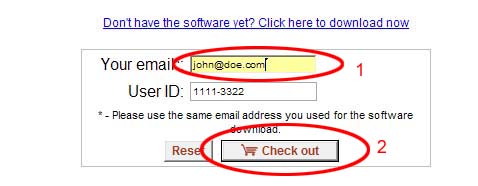
Fill in your full name in the first field and click on the "Check out" button.
Please be patient, as this may take some time to process.
Step 5
In the "Do you have a coupon" window fill in the coupon number that was included in the
covering email and then click "Submit Coupon". This will reduce the total charge according
to the coupon's discount.
Step 6
Fill in the credit card details and submit the form.
Step 7
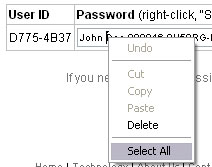
You will be presented with the invoice and your password.
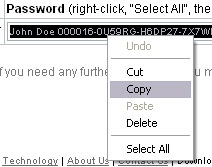
Copy the password by right clicking and selecting "copy".
Step 8
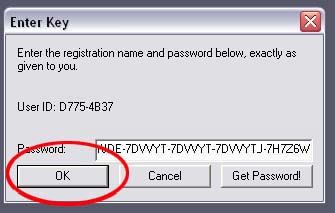
Return to the Enter Key Window of the software and paste the password that you copied
into the empty "Password" field by right clicking "Paste".
Click OK and the software will load up for your course.